
Mood tracker · Journal · HabitsYour life,in full color.
Add your mood, sleep and activities. See how your days compare over time.
Free to download. Available for iOS and Android.
How are you,really?
Choose the mood that fits. Add a note if you want to remember what happened.
Tap a face to check in, just like in the app.
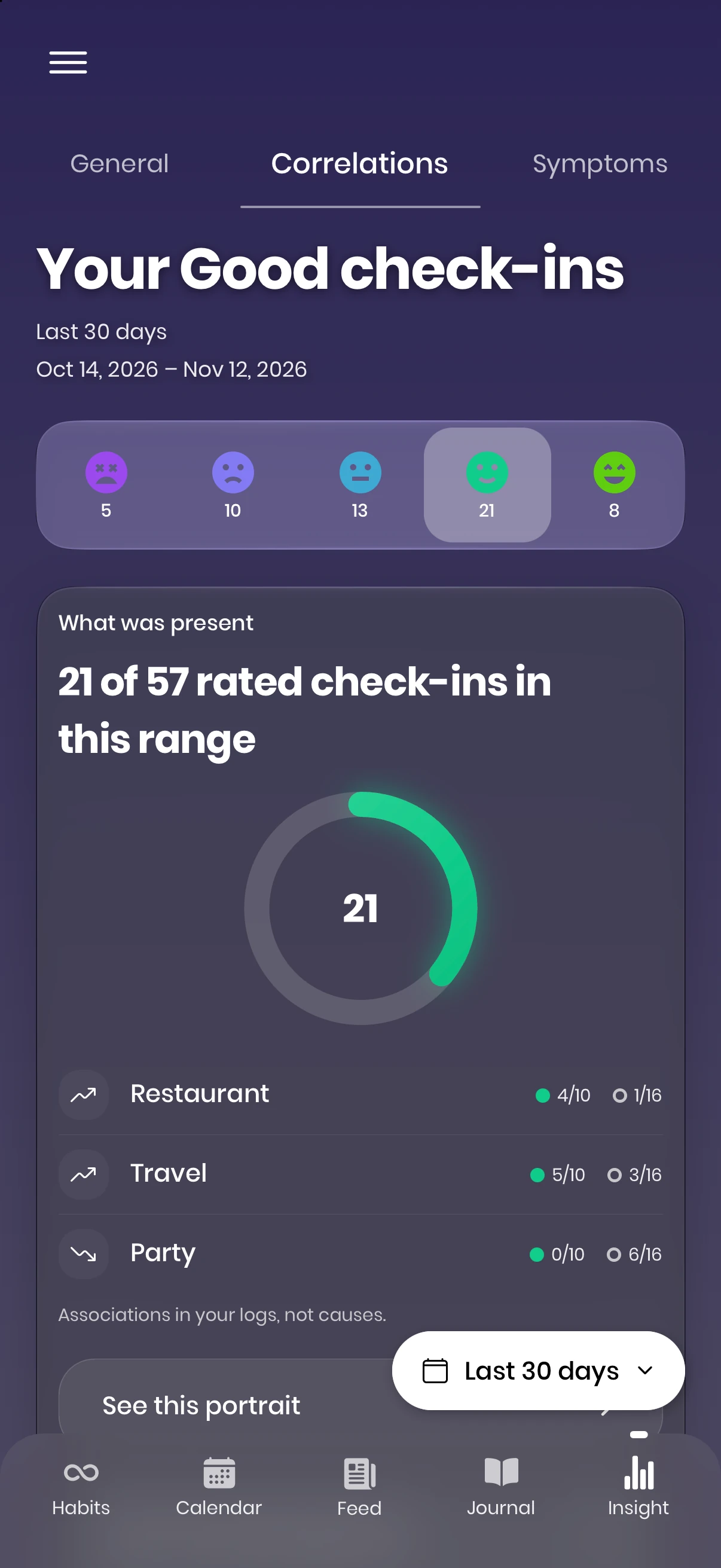
Find what makes a difference.
Compare your moods with the activities and people you log. See which ones appear most often on your better days.
- Mood broken down by activity, social interaction & life factor
- Relationship and habit correlations, ranked
- Any time window: this week, this year, all time
A few words about your day.
Write freely, remember something good, or keep a record of symptoms. Choose the journal that fits.
Example entry
Took the longer way home.
A busy morning, but I left work on time. Walked through the park instead of taking the bus.
Made pasta with Sam. We finally finished the film we started last week.
Your daily journal can hold the details a mood alone would miss.
Optional · Moodflow Plus
Meet Flowy, your AI companion.
Choose a stretch of days and talk through your mood patterns with Flowy. It explains what stands out, shows your own charts and answers follow-up questions.
Questions you can explore
- Which activities appear on my better days?
- How has my mood changed this month?
Flowy looks for patterns, not causes. Its answers can be wrong and are not medical advice. You choose whether to enable it.
How Flowy uses your data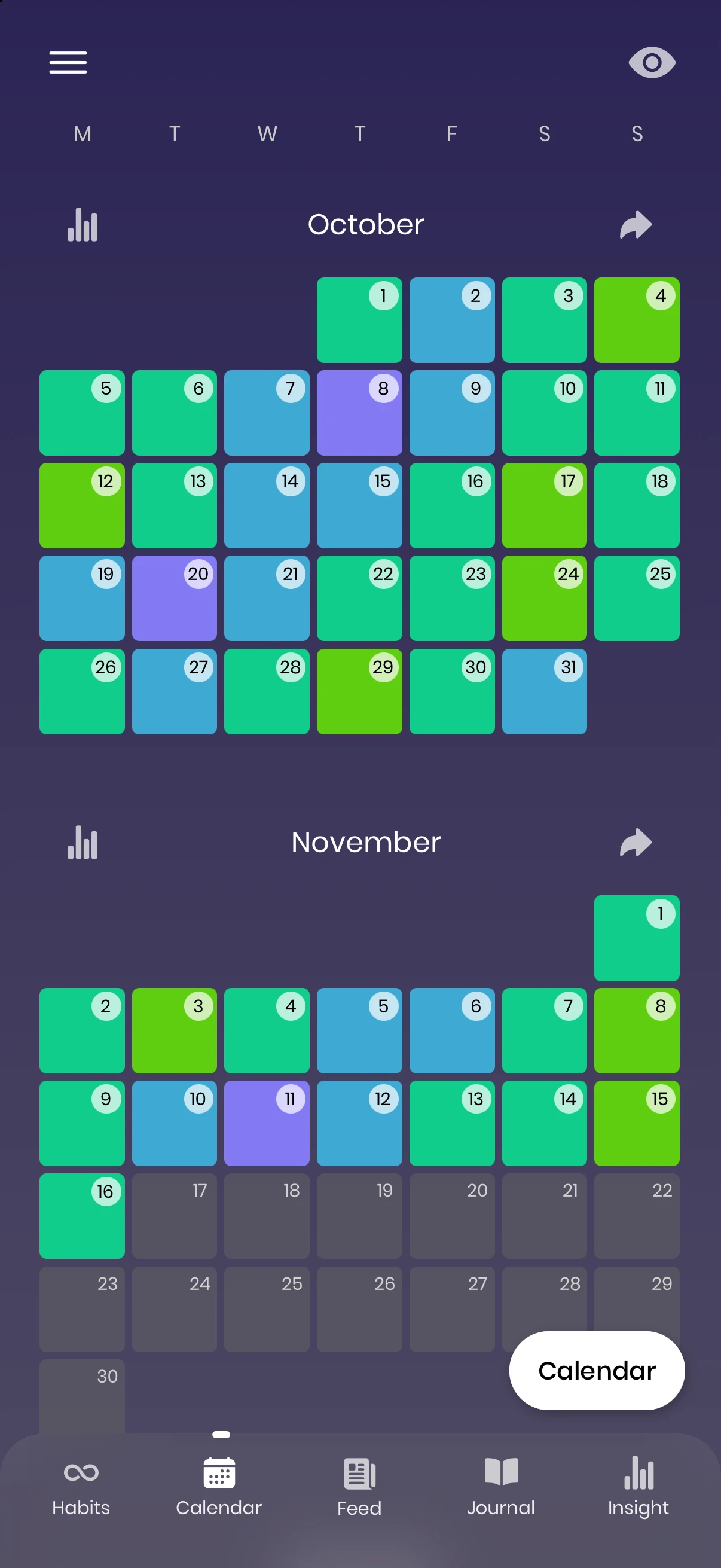
A month you can look back on.
See your moods across the month. Open a day to revisit the notes, activities and moments behind its color.
- Multiple calendar styles, fully customizable
- Highlight today, go full-width, choose your palette
- Dark mode for checking in at night
On your wrist.On your home screen.
Log a mood on Apple Watch in a few seconds, then keep your week, your habits and your year one glance away with widgets for iPhone and Android.
- An Apple Watch app with complications and Smart Stack cards
- Eleven widgets for the Home Screen and Lock Screen
- Log a mood or start a breath right from Control Center
Apple Watch · iPhone · Android
How are you?
Good
Habits you cancome back to.
Choose a habit, set your schedule and record each day you do it. Press and hold a ring to mark it complete.
- One ring for your whole day, one arc per habit
- Streak milestones, a weekly freeze and strength stages
- 28-day challenges, routines and guided breathing
- Drink water41 days·Steady
- Walk 20 minutes12 days·Building
- Breathe6 days·Starting
- Read 10 pages9 days·Building
- Phone down by 103 days·Starting
Try it: press and hold a ring.
Settle, Balance or Focus. Guided breathing that counts with you, in 4 and out 6.
Track your progress through 28 days. This example is on day 20.
Your mood,alongside your health.
Connect Apple Health or Health Connect and your sleep, steps and workouts fill in on their own. See how a short night or a long walk shows up in your mood. Optional, and it all stays on your phone.
- Sleep, steps, exercise, resting heart rate, HRV and daylight
- Moods saved to Apple Health as State of Mind
- Cycle tracking and Vitals for energy, stress and focus
Your mood is usually Good or better after seven hours of sleep.
Example dataYour whole year,at a glance
One square for each day. See how your mood changed across the months, including the days that felt harder.
Rows are months · columns are days
A closer look
Six views of Moodflow on iPhone. Select one to take a closer look.
Read the reviews in your app store.
Private by design
Your journal is stored on your device. Optional journal backups go to your own Google Drive.
No ads
No banners or video ads. Your journal stays uninterrupted.
Make it yours
Choose your colors, moods, activities, reminders and calendar views.
A place to start, whatever’s on your mind.
A mood journal can begin with a few words. Explore practical guides, research sources, and free printable templates at your own pace.
Three journal prompts for today
- What am I feeling right now?
- What happened today that I want to remember?
- What do I need next?
How to start a daily mood journal
A simple mood tracker template, a free PDF, and what to look for in a mood journal app.
Journal prompts for overthinking
Put a worry into words, understand rumination, and know when to stop writing.
Keep a sleep and mood diary
Try a two-week sleep diary PDF and learn how a written record differs from a sleep tracker.
Good to know
Quick answers about Moodflow. Looking for help with how you feel? Start with our guides to anxiety, depression and social anxiety.
What is Moodflow?
Moodflow is a mood tracker, journal and habit app for iPhone, Apple Watch and Android. You check in on a five-point scale in a few seconds, add feelings, notes and activities if you like, and Moodflow turns your entries into a mood calendar, a Year in Pixels and insights about what lifts or lowers your mood.
Is Moodflow free?
Yes. Moodflow is free to download, and the essentials are free to use: mood check-ins, journals, the calendar, Year in Pixels, habits and widgets. Moodflow Plus is an optional subscription that adds deeper insights such as correlations and timeframe comparisons, routines and photo backup. Flowy, the optional AI companion, is included in Moodflow Plus.
Does Moodflow work on Apple Watch?
Yes. The Moodflow Apple Watch app lets you log your mood in a few seconds with the Digital Crown, see your week and your consistency, and tick off habits. Complications and Smart Stack cards keep a check-in one glance away. It works alongside the Moodflow iPhone app on watchOS 10 or later.
Does Moodflow have widgets?
Yes, eleven of them for the iPhone Home Screen and Lock Screen and for Android: Log your mood, This week, 30 days, Month in pixels, Streak, Habits, Habit grid, Challenge, Routines, Breathing and Cycle. On iPhone you can also log a mood or start breathing from Control Center.
Does Moodflow connect to Apple Health or Health Connect?
Yes, if you want it to. Connect Apple Health on iPhone or Health Connect on Android and your sleep, steps, exercise, resting heart rate and HRV fill in automatically, so you can compare how you felt with what your body showed. On iPhone, your moods can also be saved to Apple Health as State of Mind.
Is my Moodflow data private?
Yes. Your journal is stored on your device. Optional journal backups are saved in a hidden app folder in your own Google Drive. Moodflow Plus photo backups use separate cloud storage. Flowy shares selected statistics and your questions only after you agree. Data imported from Apple Health or Health Connect stays on your device and is excluded from journal backups and Flowy.
What is Flowy, Moodflow’s AI companion?
Flowy is an optional AI companion in Moodflow Plus. It helps you reflect on your mood patterns, explore charts for the days you choose and ask follow-up questions. It can make mistakes, does not establish causes, and is not a therapist or a source of medical advice.
What data does Flowy see?
After you opt in, a summary of your mood statistics and the questions you ask are sent through Moodflow’s server to Anthropic to generate replies. Journal text, entry notes, photos, names of people and places, medications, cycle logs, and imported Apple Health or Health Connect data are excluded from that summary. Anything you type directly into a Flowy question is sent with it. You can turn Flowy off in Settings.
Can Moodflow help with anxiety or depression?
Moodflow is not a treatment and doesn't replace a doctor or therapist. But self-monitoring is part of evidence-based approaches like CBT and behavioral activation, and tracking your mood, sleep and activities can help you spot patterns and bring clearer information to a professional. If you are in crisis, contact local emergency services or a crisis line right away.
Start your year in color
Start with how you feel today. Add more whenever you want.
Free to download, with optional Moodflow Plus features.